

OpenAI did not ship a better chatbot on July 9. It shipped an agent that stays on a task for hours, plugs into the tools you already use, and hands back finished work instead of a paragraph. This is the full breakdown: what shipped, how the pieces fit together, what four real customers actually did with it, and what it changes for every role from sales to content strategy.
1. The Headline Shift
Two products launched together on July 9, 2026: ChatGPT Work, a new agent mode inside ChatGPT, and GPT-5.6, the model family that powers it. OpenAI frames the combination as a move from a conversational assistant to what it calls a partner for ambitious work — something that can gather information across apps, break a large goal into steps, execute those steps largely on its own, and stay with a project for hours.
The plainest way to see the shift is to compare the old interaction model with the new one.
• Old model: prompt in, answer out. The person still has to gather the source material, move it between apps, format the output, and repeat the whole cycle next month.
• New model: goal in, finished artifact out. The agent plans the approach, pulls context from connected apps, drafts the deliverable, checks in for approval on sensitive steps, and can keep the output current on a schedule.
That is the entire thesis of the launch. Not smarter answers. Fewer handoffs.
2. What Actually Shipped
Six pieces make up ChatGPT Work. Each solves a different piece of the same problem: giving an agent enough context and enough runway to finish real work unsupervised.
Plugins — the context layer
Plugins connect ChatGPT to the tools where work already lives: Slack, Microsoft Teams, Google Drive, SharePoint, email, calendars, CRMs, and project trackers, through a unified directory of more than 1,400 connected apps. ChatGPT decides on its own when a plugin is relevant, or you can summon one directly by typing “@” plus the app name, the same convention Slack and Notion use.
Scheduled Tasks — the persistence layer
Scheduled Tasks let you ask ChatGPT to run something once, repeat it on a schedule, respond to a trigger, or simply monitor something for change. OpenAI’s own examples: reviewing new Slack messages each week to refresh a meeting agenda, checking a dashboard every morning and reporting what changed, watching customer feedback for recurring themes, and updating a presentation automatically when new input arrives by email.
Desktop app, browser, and Computer Use — the action layer
The standalone Codex app is folding into a rebuilt ChatGPT desktop app with three modes: Chat, Work, and Codex. On desktop specifically, ChatGPT gets a built-in browser for researching and working with web-based tools, plus Computer Use, which lets it click, type, and move files across your local apps in the background — during a one-off task or as part of a Scheduled Task. OpenAI is retiring its standalone Atlas browser and folding those lessons into this instead, and is also updating the Chrome extension so ChatGPT can run in Chrome’s sidebar.
Codex technology — the execution engine
ChatGPT Work runs on the same underlying agent technology as Codex, OpenAI’s coding agent. More than 5 million people use Codex every week, and OpenAI says over 1 million of them now use it for work that has nothing to do with writing code — the signal that convinced OpenAI the same loop generalizes to office work generally, not just software.
Sites — the new output type
Sites, in public beta, turn a piece of work into a live, shareable web app behind its own URL — a dashboard, a project tracker, a launch calendar, a prototype, an internal portal. ChatGPT can keep a Site updated as the underlying data changes, which makes it functionally different from every other output type in the launch: a doc or deck is finished when you close it; a Site keeps working after you leave.
Auto-review — the governance layer
Auto-review uses OpenAI’s strongest models to vet risky actions — anything touching connected tools or APIs — before they execute, specifically to catch unauthorized attempts to pull sensitive data. OpenAI reports that during adversarial red-teaming, Auto-review blocked every attempt to extract protected data, including attack patterns the reviewing model had never seen in training. That is a self-reported figure from an unpublished test set, worth treating as a marketing claim rather than an audited one until independent testing exists.
3. GPT-5.6: The Engine Underneath
ChatGPT Work is powered by GPT-5.6, released the same day. Unlike previous generations, GPT-5.6 ships as three distinct tiers rather than one model — Sol, Terra, and Luna — each a durable capability tier that can now advance on its own release cadence, independent of the generation number.
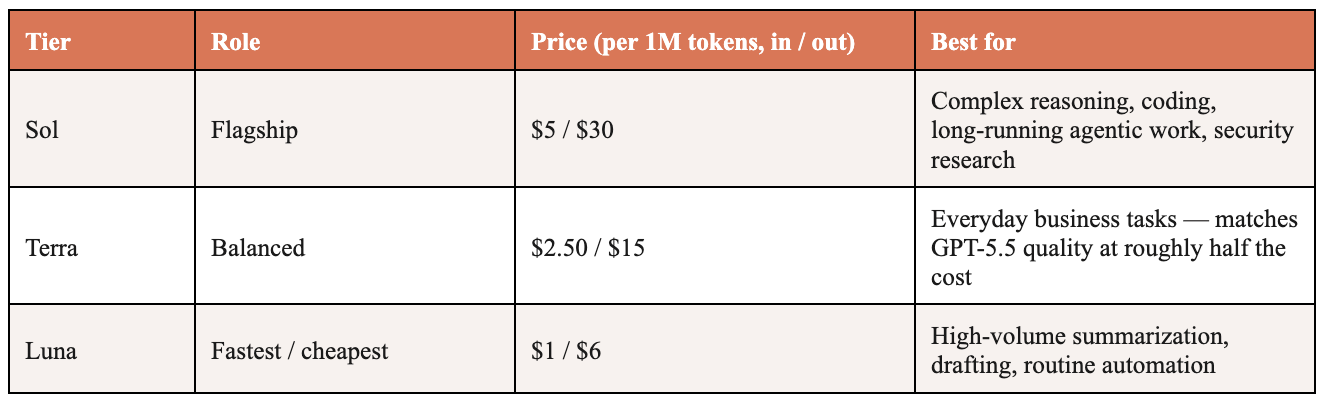
Access depends on plan and surface. In regular ChatGPT, Plus, Pro, Business, and Enterprise users get Sol at medium and higher reasoning effort, and Pro and Enterprise can select Sol Pro for the hardest tasks. In ChatGPT Work and Codex specifically, Free and Go users get Terra by default, while paid users can choose freely among Sol, Terra, and Luna and set an effort level per model. A new “ultra” mode runs four agents in parallel on the hardest problems, trading extra token spend for materially better results — available to Pro and Enterprise users in ChatGPT Work, and Plus and higher in Codex.
On benchmarks OpenAI highlights specifically for work tasks, Sol leads the Artificial Analysis Coding Agent Index at 80.0 and sets new highs on BrowseComp (92.2%) and OSWorld 2.0 (62.6%), the last of these using markedly fewer output tokens than Anthropic’s Opus 4.8 to get there. Independent benchmark trackers also show real gaps in the other direction — on SWE-Bench Pro, a widely watched coding benchmark, Sol trails Claude Mythos 5 by roughly fifteen points. The honest read: GPT-5.6 is strongest exactly where ChatGPT Work needs it to be strong — tool use, browsing, and computer control — and not uniformly ahead everywhere.
For anyone reading this as a content strategist rather than a developer, the practical takeaway is simpler: Terra is the tier most business users will actually run on day to day, and it’s priced to make that routine rather than a splurge.
4. How the Pieces Fit Together
Strip away the branding and ChatGPT Work is a six-layer loop: a goal comes in, GPT-5.6 reasons about how to approach it, Plugins supply organizational context, the browser and Computer Use let it act outside the chat window, Codex’s execution engine does the actual work, and the output lands as a shareable artifact — with a human approval gate before anything sensitive happens, and Scheduled Tasks to keep it current afterward.
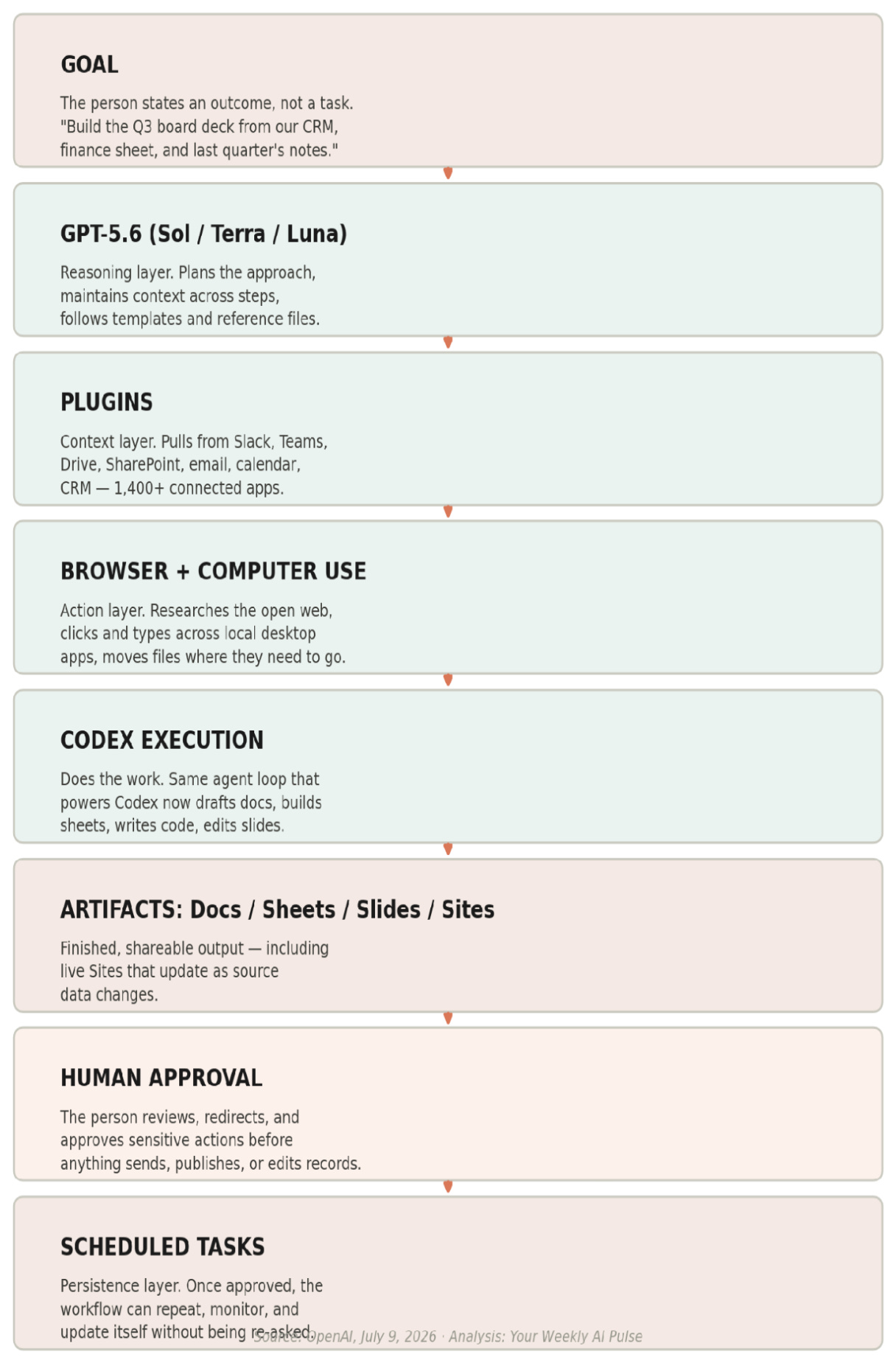
Two design choices in that loop matter more than they first appear. First, the plan is visible before execution starts — OpenAI’s suggested way to learn the product is to hand it something you already know well, like a budget variance review or a sales meeting prep, precisely so you can watch it plan and correct course before it commits to a direction. Second, approval is a gate, not an afterthought: the person decides what ChatGPT can access, when it should check in, and when it needs sign-off before acting, and can redirect the work mid-stream rather than only reviewing it at the end.
5. Rollout, Pricing, and Access
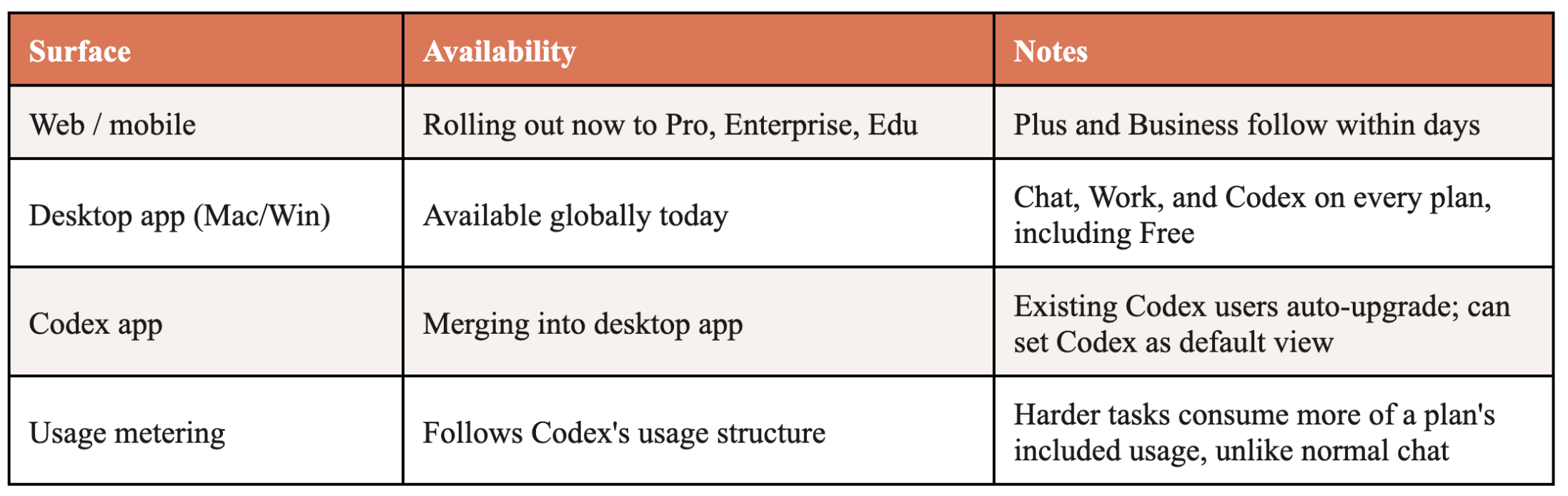
Enterprise and Edu admins get centralized control over who has access, what company context ChatGPT can use, which tools it can connect to, and what actions it’s allowed to take — on web through plugin and connected-tool permissions, on desktop through Codex’s existing enterprise governance model extended to local files, apps, and browser access. A Compliance API gives admins visibility into ChatGPT Work conversations and actions at scale, and the Admin Console lets them set workspace-level spend defaults, group limits, and per-person overrides as adoption grows.
6. Four Real Customer Stories
OpenAI shared four named customer accounts on the launch page. Read together, they show the same underlying pattern in different domains: connect scattered sources, hand over a recurring coordination job, and get back a system rather than a one-time document.
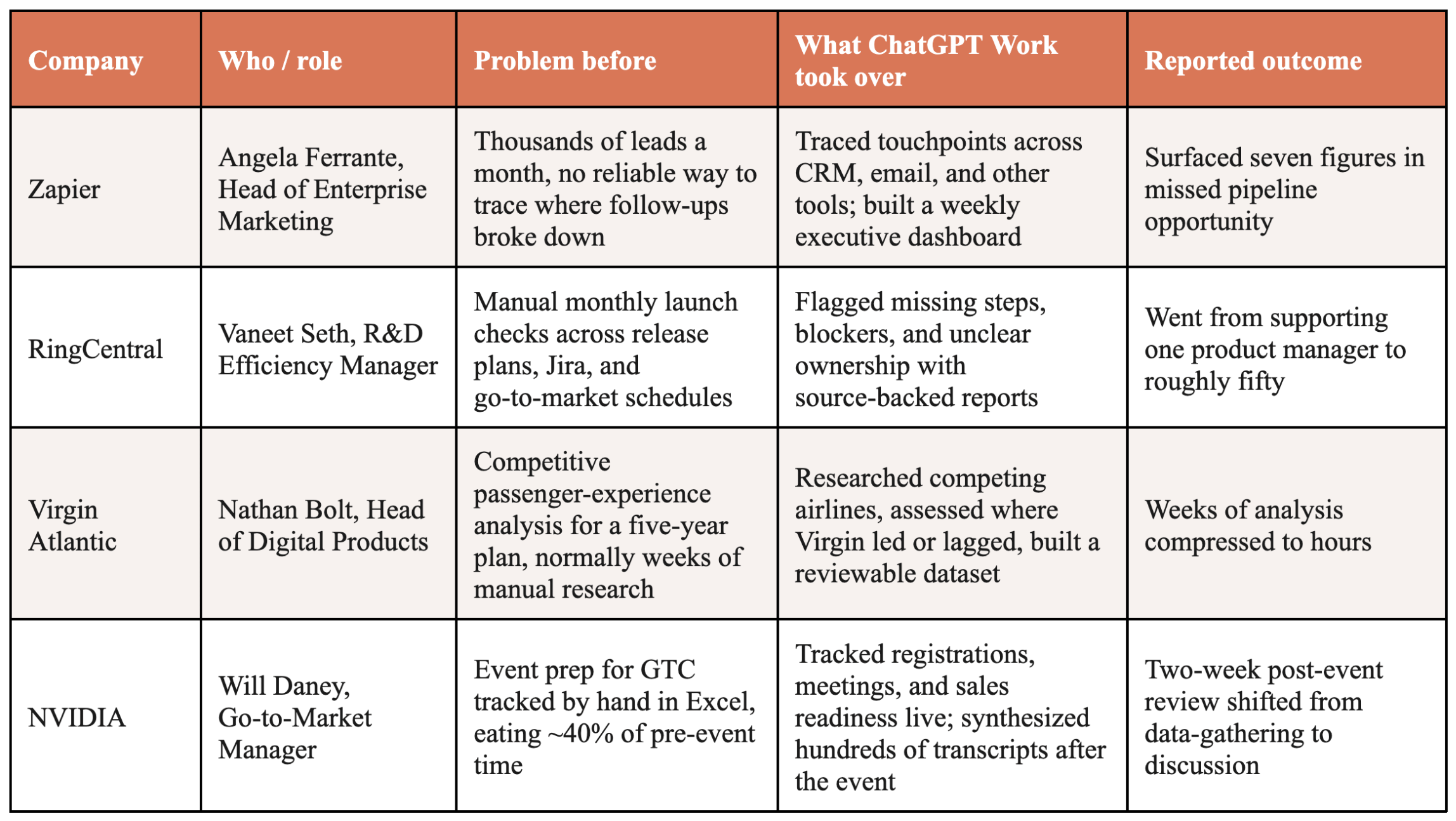
OpenAI also shares two internal examples. In sales, a discovery call was turned into a tailored proof-of-concept within 24 hours — a process the company says normally takes weeks — with ChatGPT structuring the notes and routing the request to a solutions architect while the salesperson stayed focused on the customer. In finance, month-end close and forecasting moved from days to hours, with ChatGPT finding source data, moving it into Excel or Sheets, reconciling it, building the slides, and verifying the results, freeing the finance team to spend its time explaining what changed rather than assembling the numbers.
7. Example: The NVIDIA Story
The NVIDIA story is the cleanest of the four because it shows a complete arc — before, during, and after a real event — inside one workflow.
The setup
NVIDIA’s Go-to-Market Manager, Will Daney, used to run event prep for GTC, NVIDIA’s global conference, entirely by hand in Excel: tracking which customer accounts had registered, what meetings were on the calendar, and how the field sales team was preparing. Maintaining that spreadsheet ate roughly 40 percent of his pre-event time.
What he connected
He linked ChatGPT Work to the relevant systems — CRM and account data, meeting schedules, sales team inputs — and let it take over the tracking job the spreadsheet used to do.
During the event
ChatGPT tracked account registrations, planned meetings, and field sales readiness continuously, the same three things the spreadsheet tracked before, minus the manual upkeep.
After the event
This is where it goes further than a spreadsheet ever could. ChatGPT synthesized hundreds of session transcripts and customer-meeting notes to assess whether GTC actually met its goals — unstructured input in, a structured evaluation out, with no one manually reading and tagging every transcript.
The result
The team’s two-week post-event review shifted from assembling data to discussing what the data meant.
Why this is the example to study
It carries all three defining traits of ChatGPT Work in one workflow: it pulls from multiple live sources rather than one file, it persists across a multi-day event rather than answering a single prompt, and it converts unstructured input into a structured deliverable. That’s the actual product being sold — not sharper writing, but an agent that owns a piece of ongoing operational work the way a junior analyst would, minus the junior analyst.
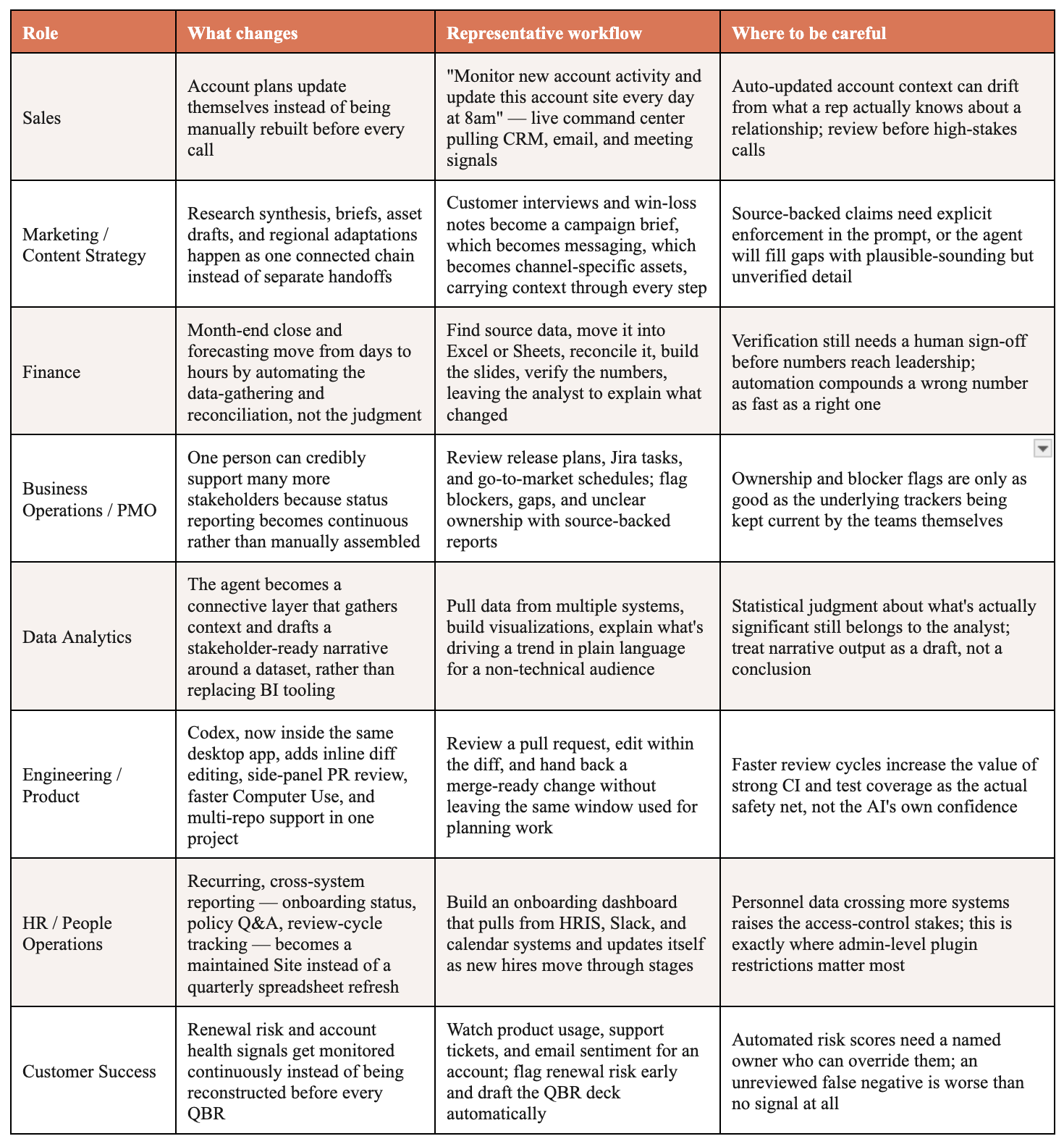
8. How ChatGPT Work Changes Each Role
OpenAI’s launch page groups use cases by team: Sales, Marketing, Finance, Business Operations, Data Analytics, and Engineering. Here is what that looks like in practice, role by role, including where the risk sits for each.
9. ChatGPT Work vs. Claude Cowork / Claude Code
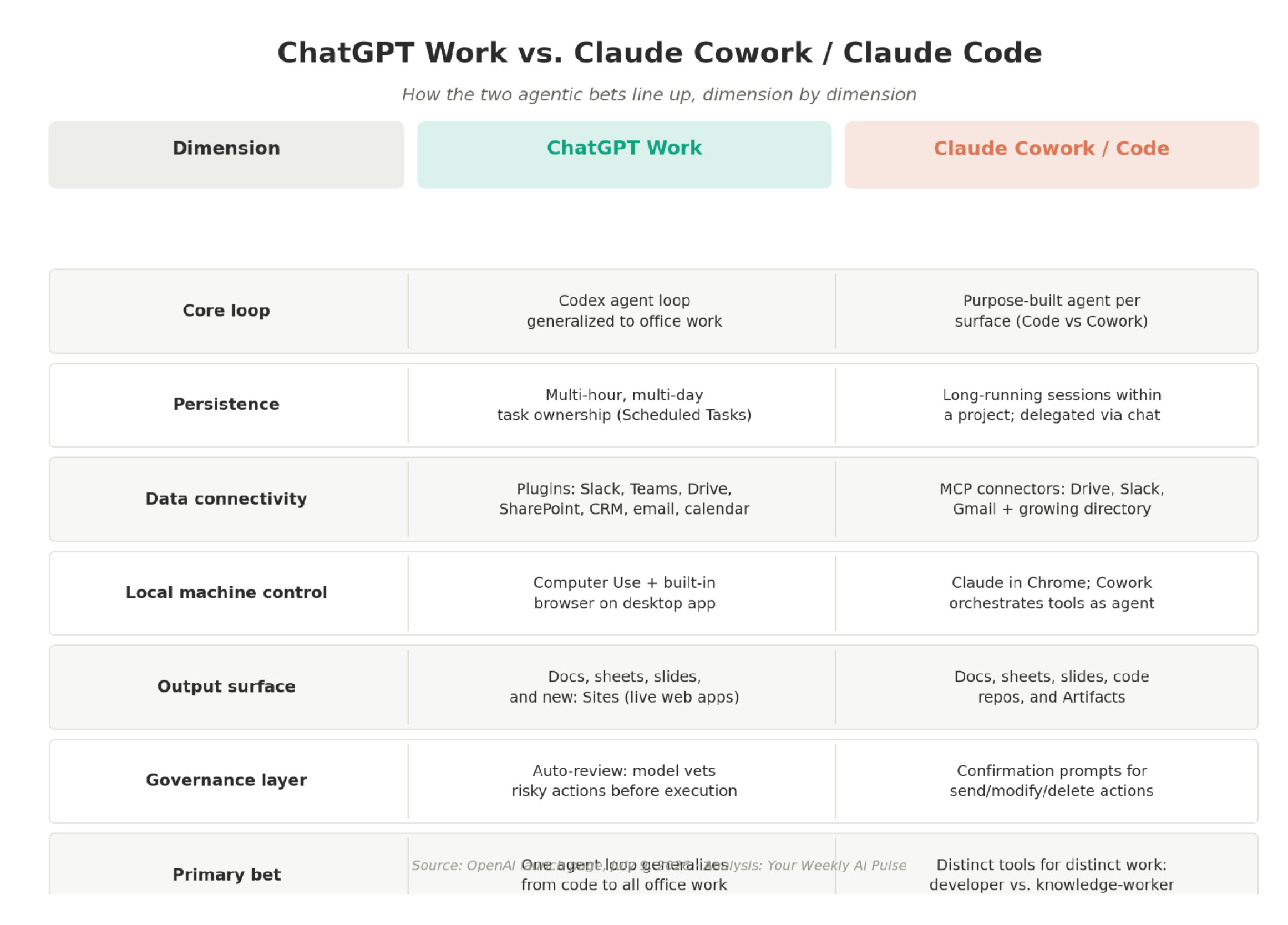
The positioning language — stay on a task for hours, connect to your tools, hand back finished work — is nearly identical to what Anthropic has been saying about Cowork and Claude Code. That’s not a coincidence. Both companies have concluded the next competitive battleground is task ownership, not answer quality. Where they diverge is architecture: OpenAI is generalizing one agent loop, the Codex loop, across every kind of work, while Anthropic has kept its tools separated by job, Claude Code for developers and Cowork for knowledge work, each tuned for its own surface.
10. Governance in Practice
Three things are worth tracking closely as this rolls out, because they are the actual load-bearing claims behind “you can trust this with real work.”
Auto-review’s 100% figure is self-reported against an unpublished adversarial test set with no named third-party auditor. Treat it as a marketing claim until independent red-teaming exists — not because it’s necessarily wrong, but because there’s no way yet to verify it.
Admin controls are genuinely granular — access, connected tools, network access, and sensitive-action restrictions can all be set at the workspace or group level — but granularity only helps if someone actually configures it before rollout, not after an incident.
The approval gate is a design choice, not a guarantee. The person decides what needs sign-off; a default of low friction anywhere in a connected workflow will get exploited by the workflow’s own convenience over time.
11. The Takeaway
Watch Sites and Auto-review over the next few months. Sites is OpenAI’s first move into persistent, shareable output that lives outside the chat window entirely — a real product surface, not a feature checkbox. Auto-review is the tell that OpenAI knows an agent with Computer Use and CRM access is one bad tool call away from a very public incident, and it’s racing to prove the guardrails hold before someone else finds the gap first.
The bigger story isn’t the feature list. It’s that two of the largest AI labs on earth have independently reached the same conclusion: the product worth building isn’t a better answer. It’s an agent you can hand a real job to and walk away — with the judgment about what “real job” means safely left up to the person doing the handing off.